Set Up Child Device
A Child Device allows children to view their assigned chores, submit completed chores, and redeem earned screen time on their own phone or tablet.
To connect a Child Device to your family, you'll generate a temporary setup code from a Parent Device.
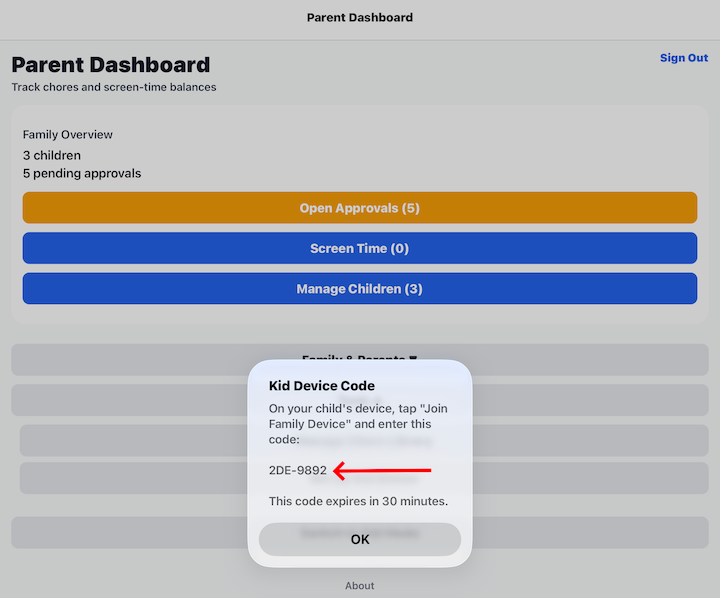
Generate a Setup Code
From the Parent Dashboard, open Tools and select Set Up Child Device.
A temporary setup code will be displayed.
The setup code:
- Is unique to your family.
- Expires after 30 minutes.
- Can only be used to connect one Child Device.
Connect the Child Device
On the phone or tablet that will become the Child Device:
- Open Barnacle Bucks.
- Select Join Family Device.
- Enter the setup code shown on the Parent Device.
- Complete the setup process.
Once the device has been connected, children can log in using their Child PIN.
See Join Family Device for the remaining setup steps.
Security
The setup code provides temporary access for connecting a device to your family.
For your family's security:
- Share the code only with someone setting up your child's device.
- If the code expires, simply generate a new one.
- The setup code cannot be used after the device has been successfully connected.
Tips
- Each phone or tablet only needs to be connected once.
- A family can use one shared Child Device or multiple Child Devices.
- After setup is complete, children log in using their Child PIN instead of the setup code.