Child Login
The Child Login screen allows children to securely sign in using their personal Child PIN.
Each child has their own profile and PIN, allowing Barnacle Bucks to display the correct chores and screen time balance.
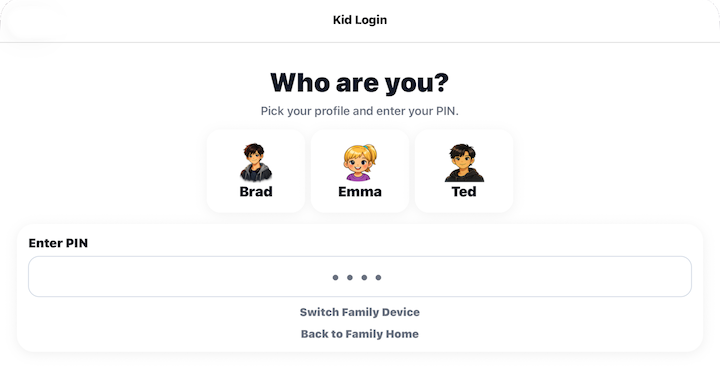
Choose Your Profile
Tap your avatar to select your profile.
The selected child's PIN is used to sign in.
Enter Your PIN
Enter your four to six digit child PIN.
When the correct PIN is entered, Barnacle Bucks automatically signs you in and opens the Today's Chores screen.
If an incorrect PIN is entered, simply try again.
Switch Family Device
Select Switch Family Device if you want to connect this device to a different family.
The current family connection will be removed, and you'll be taken to the Set Up Child Device screen where you can enter a new Family Setup Code.
See Set Up Child Device for step-by-step instructions.
Back to Choose User
Select Switch User to return to the Choose User screen. This is located in the upper right hand corner of the screen.
From there you can switch back to Parent mode or choose another option.
Tips
- Every child should have their own Child PIN.
- Choose your profile before entering your PIN.
- After signing in, all chores and screen time shown belong only to the selected child.